

How to Make File Folder Labels for Better Organization
How to make file folder labels with step-by-step instructions. Pictures, examples, and resources to help you personalize your filing system.

Yes, file folder labels seem boring—but they can save you serious time
Honestly, I don’t think anyone starts a small business thinking about how exciting it will be to organize receipts, vendor paperwork, tax documents, or inventory folders. Certainly, nobody sits around dreaming about making file folder labels. But here’s the reality: the more your business grows, the easier it becomes for paperwork and loose documents to pile up everywhere.
Do you ever end up stuck, wasting time searching for invoices, reprinting forms, or trying to remember where you saved something important? I’ve definitely been there, and that’s when it finally clicked for me: simple organization systems help me run my business so I can focus on the exciting stuff. Just labeling things can even help work feel less stressful because categorization is associated with reducing cognitive load. Basically, your brain spends less effort sorting through information when items are grouped consistently.
In this article I’ll show you how a good file folder labeling system doesn’t just make your office look cleaner—it helps you work faster, stay focused, and spend less mental energy. I’ll also walk through practical organization tips, label types, and printing methods that can make managing paperwork much easier.
Plan your filing system before you print labels
Before you start designing file folder labels, take a few minutes to think about how you actually use your files day to day. It seems so simple, but I’ve noticed that planning it out makes a big difference when it comes to how much time I spend setting up a filing system. And I definitely see a big difference between what works for my household paperwork, work files at my full-time job, and paperwork for my small business.
Decide what you actually need to organize
How my home office looks and feels is very important to me, so I prefer keeping paperwork tucked away where I can’t see it at all. So much so that I converted one drawer in my wall-to-wall storage unit into a small hanging file system. I don’t need an entire filing cabinet, but having a few clearly labeled folders makes important documents much easier to find.
Sometimes, files will need to be organized outside of your office too. If you sell at in-person events like markets, conventions, or craft fairs, there’s usually a shortlist of paperwork you need to have on hand.
For example, I use a portable banker’s box with file folders when I’m vending at events. Behind the scenes at my booth, I need to keep track of sticker sheets, thank you cards, custom order forms, receipts, and important paperwork like my seller’s permit. I keep all these items organized in labeled folders so I can quickly grab what I need during busy conventions.
Choose a labeling style that will stay consistent
Even though file folders might not be exciting, what I really appreciate is that if you keep your labeling system simple and consistent, it’s actually pretty easy. You can organize folders by category, client, project, or even by year—just try to choose a system that will still make sense later when you’re in a hurry searching for something important.
Color-coded labels can also make files easier to scan quickly, especially if you manage multiple projects or different types of paperwork at once. If color-coding helps you stay organized, you can also use similar systems for planners, schedules, and project management.

Think about how often your folders change
Some folders stay the same for years, while others constantly need updates. In fact, a lot of categories you need for your business might also stay the same.
For me, my tax folders are very simple and rarely change. I just use folders labeled Q1, Q2, Q3, Q4, and Archive, so I don’t have to relabel everything every year.
On the other hand, some of the folders I use for conventions change all the time. Important paperwork like my seller’s permit and EIN information always stay the same, but promotional materials can vary from event to event. Sometimes I’ll have different postcards, discounts, or special offers for customers and other vendors, so I keep those items separated into clearly labeled folders.
Running a small business can get chaotic quickly, especially when you’re balancing multiple projects, customers, deadlines, and paperwork at once. When everything starts moving fast, knowing exactly what you need and where to find it can save a surprising amount of time and stress.
How to make file folder labels online
Choose your file folder label product
Before you start designing your file folder labels, you’ll need to choose the label product you want to use. Thankfully, this part is usually pretty simple—you mainly just need to choose the size, material, or file folder style that works best for your system.
If you want to print file folder labels yourself, Avery offers both packaged file folder labels and printable blank labels by the sheet. Packaged products are great for common filing setups and include options like hanging file folder tabs and color-coded labels. Blank labels by the sheet offer even more flexibility, including a wider range of sizes and materials for printable file folder labels.
Common file folder label sizes
Most standard file folder labels are around 2/3″ x 3-7/16″, while many hanging file folder tabs use smaller insert sizes. If you’re unsure what to choose, starting with a standard file folder label size is usually the easiest option for everyday organization.
Open your template in Avery Design & Print Online
Once you’ve chosen your file folder labels, you can open the template in Avery Design & Print Online, which is Avery’s free label design software. This is where you’ll customize your file folder labels with text, colors, icons, logos, and other design elements.
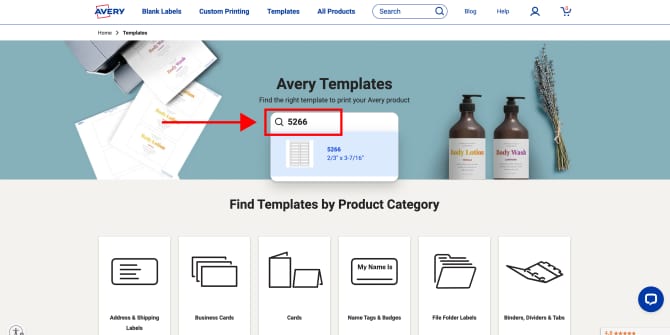
If you already have Avery file folder labels or blank labels, you can enter the product number from the packaging or product page to open the correct template. From there, you can choose whether you want to start with a blank template or customize a predesigned layout.
Personally, I usually start with a blank template for file folder labels because I want them to stay simple and easy to read. But if you want something more decorative or color-coordinated, there are also predesigned templates that can help you get started faster.
Customize your file folder labels
Once your template is open, you can customize your file folder labels with text, colors, logos, icons, and background fills to match your filing system. You can even save your projects to reprint later or share with your team. Personally, I usually keep my file folder labels pretty simple so they’re easy to read at a glance, but color-coding can be especially helpful for organizing taxes, projects, archived paperwork, or client files.
Need help? Check out these resources in our online help center:
How to print file folder labels correctly
Printing file folder labels is usually pretty straightforward once your template is set up correctly. Step one is just to make sure you’re using the right type of labels for your printer. In my experience, most other printing problems come down to printer settings or alignment issues. But you can head off most of those issues if you do a quick test print before using your label sheets.
Before you print:
- Set your printer settings to “Labels,” “Heavy Paper,” or “Cardstock”
- Make sure your print scale is set to 100%
- Double-check that your labels are loaded correctly for your printer model
- Print a test page on regular printer paper first
- Hold the test page behind your label sheet with light behind it to check alignment

How to choose the best file folder labels for your workflow
There’s no single “best” option—it’s really about choosing a system that feels easy to maintain and works well for your space, workflow, and filing habits.
The best file folder labels for your workflow really depend on what you need to organize and how you prefer to work. Personally, I love hanging file folder tabs because they make color-coding very easy, especially for things like taxes and archived paperwork. I also prefer clear file folder labels for some projects because they create more of a clean, printed-on look. I find that visually quiet labels like that don’t compete with my office or booth aesthetics.
For folders that change often, I usually prefer removable file folder labels because they peel away cleanly when I need to update categories or reuse folders. Other people may prefer standard white labels for simple everyday organization or labels with TrueBlock® technology to cover up old text.
Comparing different types of file folder labels
| Label type | Best for | Why people choose it |
|---|---|---|
| Standard white labels | Everyday filing systems | Clean, easy to read, versatile |
| Removable labels | Reusable folders | Peel away cleanly when categories change |
| Colored labels | Color-coded systems | Faster visual organization |
| Clear labels | Minimalist/professional look | Blend into folders cleanly |
| Hanging file folder tabs | File cabinets & shared systems | Easier visibility in drawers |
And if standard file folder label sizes don’t quite fit your setup, you can also order custom labels in almost any size online, even in relatively small quantities.
Common questions about file folder labels
Standard file folder labels are commonly around 2/3″ x 3-7/16″, although hanging file folder tabs may use smaller insert sizes depending on the filing system. If you’re unsure what to choose, starting with a standard file folder label size is usually the easiest option for home offices and small business organization.
Yes. Most printable file folder labels are designed to work with standard inkjet or laser printers. Before printing, make sure your printer settings are adjusted for labels, heavy paper, or cardstock, and always test your alignment on regular printer paper first.
Usually, yes. Hanging file folders often use special tabs with inserts instead of standard adhesive file folder labels. Typically, hanging file folder tabs are self-adhesive so you can attach them directly to the folder and include printable inserts that slide into the tab. This makes them easy to organize, replace, or color-code.
It really depends on how often your folders change. Permanent file folder labels work well for archived paperwork or long-term filing systems that rarely need updates. Removable labels are usually better for active projects, reusable folders, or small business workflows that evolve over time.
Absolutely. Removable file folder labels are a great option for folders that change often because they peel away more cleanly when you need to relabel or reorganize your files. They’re especially helpful for active projects, temporary paperwork, or reusable filing systems.
Neither option is necessarily better—it mostly comes down to personal preference and how you organize your files. White labels are simple, easy to read, and work well for color-coded systems. Clear labels create more of a printed-on look that blends into folders and feels less visually distracting.
The most common printing problems usually come from alignment issues or incorrect printer settings. A quick test print on regular paper can help you avoid wasting label sheets. Other common mistakes include printing at the wrong scale instead of 100%, loading labels incorrectly for your printer type, using labels that aren’t designed for your printer, or skipping a test print before printing directly on label sheets.
Create a filing system that works for you
Honestly, organizing paperwork will probably never be the most exciting part of running a business or getting your home office in order. But having a filing system that actually works can save you a surprising amount of time and mental energy.
Whether you prefer removable labels for active projects, hanging file folder tabs for archived paperwork, or clear labels for a cleaner look, the best file folder labeling system is the one that feels easy to maintain long term. Once you find a setup that works for your space and workflow, staying organized becomes much easier.
Ready to get started? Explore Avery file folder labels and find options that fit your workflow, filing system, and workspace.


