

Our Best Advice for Making Christmas Address Labels at Home

How do I make my own Christmas address labels at home?
To make your own Christmas address labels at home, you’ll need a few things. These include a smart device with a connection to the internet, design software, printable labels, and a compatible printer. Using Avery printable labels and free design tools is one way to do everything at home and make the whole process easier.
Everyone loves seeing a new Christmas card in their mailbox, and a personalized address label definitely stands out. With Avery tools, creating your own Christmas address labels is actually much easier than you might think. In this article, I’m going to share my best advice for making address labels at home that will help you not only make your Christmas cards pop… but also get them ready to mail faster.
Two ways to get started with Christmas address labels
Avery Design and Print Online is our free design software that you can use right in your browser without downloading anything.
Start with a product: Choose your labels first, then select a predesigned template to customize or a blank template to design from scratch or upload your own artwork.
Start with a design: Browse our collections of free label designs, find one you love, and choose the label product you want to use it on.
What are the best labels for Christmas cards?
The best labels for Christmas cards are ones that fit comfortably on your envelopes, have enough room for an easy-to-read address, and complement your holiday stationery. Beyond that, you have plenty of flexibility to experiment with different label shapes, sizes, and materials.
Get creative with label shapes
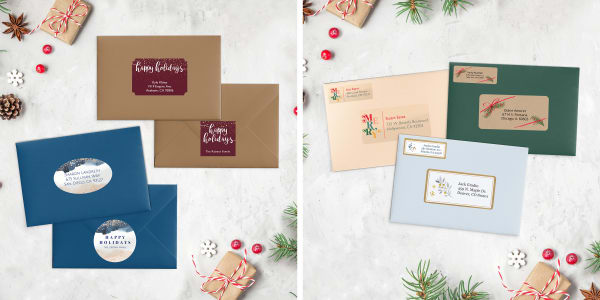
Who says your Christmas address labels need to be rectangles? As long as the shape and size you choose leave enough room for your complete address, you’re generally good to go. But our guide to address label sizes digs into this in much more detail. Classic rectangular address labels can easily be replaced with square, round, or oval labels for a more contemporary look. You can also try scalloped labels for a more elegant silhouette.
Personally, I really love the look of arched and hexagon labels because you don’t see them very often. But if you can’t decide, try taking our label personality quiz—it’s a fun way to see what shape suits your personality the best.
Choose materials that complement your Christmas cards
Choosing different materials than plain matte white can add a lot of personality to your Christmas address labels. Here are a few of my favorite options for holiday mailings:
- Matte white labels: A versatile choice with a smooth, non-glossy finish that works well with traditional Christmas card designs.
- Glossy white labels: Great for making colorful holiday graphics and photos really pop.
- Glossy clear labels: Blend in with your envelopes for an elegant, printed-on look.
- Gold foil border labels: Add a touch of sparkle and elegance to your holiday stationery.
- Kraft brown labels: Perfect for a more natural, rustic Christmas aesthetic.
Our blank labels are also available in unique materials that are not available in stores, giving you even more options for personalizing your holiday mail. You can browse all of our blank label materials and use our comparison tool to compare up to four materials side by side.
Are clear or white address labels better for Christmas cards?
White address labels provide a solid background for your text and graphics, while glossy clear address labels create a printed-on look that lets the color of your envelope show through.
If you’re printing clear Christmas address labels at home, consider the contrast between your ink and envelope colors. I recommend using dark text on light-colored envelopes to ensure your addresses are easy to read.
But, if you love the look of light-colored text on dark envelopes, you can still make it happen. After you design your own labels at home, then you can have them custom printed by Avery.
A special printing technique called white underprint makes lighter colors stand out on clear labels, even when applied to dark surfaces.
What’s the difference between matte and glossy Christmas address labels?
The main difference between matte and glossy labels is the finish. Matte labels have a non-reflective finish, while glossy labels have a shiny finish. However, the effect also depends on the label material you choose.
- Matte white: Provides a classic, understated look that complements traditional holiday designs.
- Glossy white: Makes colorful holiday graphics and photos pop.
- Matte clear: Creates a subtle, frosted effect on your envelopes.
- Glossy clear: Blends in with your envelopes for a printed-on look.
Find the right labels for your holiday mailing list
Whether you’re shipping out gifts, cards, invitations, or more, it’s a good idea to take a survey of what size labels you’re going to need and prepare ahead of time. You can filter our mailing labels by size or shape to find exactly what you need to make your Christmas address labels perfectly you.
| Label | Order Product | Holiday Templates |
|---|---|---|
| 1″ x 2-5/8″ Matte White | Package for laser printers (5160) For inkjet printers (8160) By the sheet | View & customize |
| 1″ x 2-5/8″ Glossy Clear | Package for laser/inkjet printers (6521) By the sheet | View & customize |
| 3-1/3″ x 4″ Matte White | Package for laser/inkjet printers (15264) By the sheet | View & customize |
| 2″ Round Glossy White | Package for laser/inkjet printers (22807) By the sheet | View & customize |
| 2″ Round Gold Border | Package for laser/inkjet (22876) | View & customize |
| 2″ Square Matte White | Package for laser/inkjet printers (22806) By the sheet | View & customize |
| 7-17/20″ x 1-3/4″ Water-Resistant Wraparound | Package for laser/inkjet printers (22838) | View & customize |
| 1-1/2″ x 2-1/2 Oval Glossy White | Package for laser/inkjet printers (22804) By the sheet | View & customize |
| 2″ x 3″ Scalloped Rectangle, Matte White | By the Sheet | View & Customize |
Personalize your Christmas address labels
One reason I always recommend the free Avery design software is that it gives you the flexibility to create Christmas address labels in three ways:
- Upload your own design. Create your artwork in Canva®, Adobe Illustrator®, or another design program, then upload it to our software to format it for printing at home.
- Design from scratch. Use our built-in design tools to create your own festive labels with images, graphics, fonts, and colors.
- Customize a free template. Browse our collections of predesigned templates, find a design you love, and start personalizing it right away.
Where can I find free Christmas address label templates?
You can find free Christmas address label templates in two places on Avery.com: our collection of address label designs and our collection of Christmas label designs. Both offer plenty of festive designs that you can customize using our free online editing tools.
Every element in our templates can be moved, adjusted, or customized. Add a family photo, change the colors to match your Christmas cards, or simply add your address information and you’re ready to go.
Coordinate your holiday mailing supplies
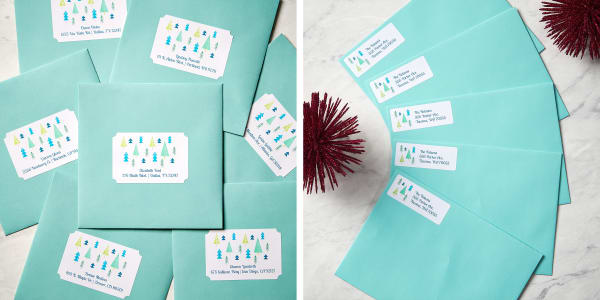
If you’re like me, the idea of matching all your Christmas address labels, return address labels, and envelope seals is so satisfying! Many of our free templates feature the same design across different products, making it easy to create a coordinated look. Try browsing our holiday templates and filtering by category, shape, or size to find matching designs.
If you’ve created your own design, you don’t have to start from scratch for each product. The Apply Design feature in our free software lets you use your existing design on other Avery products. You can also apply saved designs to any Avery product with this tutorial.
Save time addressing your Christmas cards
Addressing your Christmas cards doesn’t have to be so time-consuming. These are a few tricks I use to get everything done faster without anything looking sloppy or careless.
How do I print addresses from a spreadsheet onto labels?
You can print addresses from a spreadsheet onto Christmas address labels using the Mail Merge feature in our free Avery software. Simply import your spreadsheet, arrange the address fields on your label template, and let our software automatically populate your labels with individual addresses.
The first time I made my own address labels for Christmas cards, I typed out every address individually. It felt like it took forever, and there was no easy way to repeat the process the following year.
Then I discovered Mail Merge, and it changed everything. All I needed to do was enter addresses for my friends and family in a spreadsheet once. If anything changed during the year, I just updated the sheet.
After that, adding my entire mailing list to individual address labels was a snap. It literally only takes a few minutes to do.
How do I make Christmas return address labels?
The easiest way to make Christmas return address labels at home is to use the Edit All feature in our free Avery software. Customize your design and enter your return address just once to create an entire sheet of identical labels.
Creating festive return address labels for your Christmas cards is especially easy with the ADPO Edit All feature. You can get started by browsing our collection of free templates for return address labels. Then, select your favorite design to open it on the editing screen. While you’re in “Edit All” mode (which is the default), type your return address on one label, and our software will automatically apply those changes to the entire sheet.
Can I put the return address and mailing address on the same label?
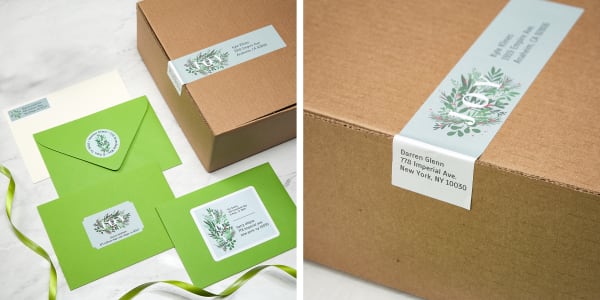
Yes, you can save time addressing your Christmas cards by printing both the mailing address and return address on a single large label or a wraparound address label. Just make sure your return address is positioned in the upper-left corner of the envelope and is clearly distinguishable from the recipient’s address.
Save time with a smart design for the address labels on your Christmas cards. Instead of using a return address label and an address label, print both on a single large shipping label. Use one of our predesigned templates for destination and return addresses, or create your own by adding and moving text boxes in ADPO.
Get your Christmas cards in the mail on time
Pay attention to Christmas shipping deadlines so that you can make sure your Christmas cards are sent out on time. Shipping and mailing cutoff dates can vary depending on the service and shipping speed you choose. It’s a good idea to check these as early as possible.
The best tips for making your own Christmas address labels
To sum things up, the address label is the first thing people see when your Christmas card arrives. Make it the best it can be with a few expert tips. First of all, use free holiday templates! You can also add personality to your Christmas cards with different label size, shape, and material options. You can find every mailing label size, material, and quantity you need using filters on Avery.com label pages. Or, refer back to our handy table above.
Next, save a step by using larger labels with both the destination and return addresses. You can also save time by using the Mail Merge feature in ADPO to import all your addresses at once. Similarly, the Edit All feature saves time when you’re creating return address labels.
Choosing Avery labels with Sure Feed technology makes printing easier by helping to prevent jams and misalignments. If you want to skip printing altogether, we can even print your Christmas address labels for you. Finally, make sure you check the mailing cutoff dates for Christmas delivery. You want to be sure your perfectly labeled cards arrive on time.
Why not get started now?


