

How to Make a Custom Binder (DIY or Professionally Printed)
Learn how to make a custom binder with DIY covers or professional printing. Follow step-by-step instructions, tips, and free templates.

Two easy ways to make a custom binder
Let’s be honest, most people think binders are boring, but you’re here so you know better. Yes, binders are functional and don’t always spark joy—but they have the potential. And more importantly they can help you make a great first impression when you need to show up looking and feeling professional. The good news? Making a custom binder is much easier (and affordable) than it sounds. In fact, with the right tools, you’ve got more options than ever to get the exact look you want.
Now into the nuts and bolts: there are two main ways to make a custom binder:
- Have your design custom-printed on a binder.
- Add a custom binder cover and spine insert to a view binder.
Which path you choose, pretty much depends on how fast you need it, how many you’re making, and how hands-on you want to be. So, I’ll walk you through both options step by step. Whether you’re looking for professional binders for your business, decorative 3-ring binders for home, or cute 3-ring binders for school, this guide has you covered.
And if you’re the type who loves options (same), you’re in luck. I’ve also included plenty of free printable binder cover and spine designs you can customize right away.
How to make a custom binder (quick steps)
If you just want the short version, here’s the overall process:
- Decide whether you want a custom-printed binder or a DIY binder with printable inserts.
- Choose or create a design that fits your purpose (business, home, or school).
- Customize your binder cover and spine with text, colors, or a logo.
- Either order your binder professionally printed or print your cover sheets and spine inserts at home.
- For DIY: assemble your binder and swap in your custom covers.
That’s it. Once you know which route you’re taking, the rest is just details, and I’ll walk you through both options step by step below. If you already know the path you want to take, feel free to jump to the custom-printed binder instructions or the DIY custom binder instructions.
What is a custom binder?
A custom binder is exactly what it sounds like: a binder that’s customized to fit your workflow, content, and style. Instead of a plain, generic cover, you can personalize the front, back, and spine with your own design. That could mean adding a business name or logo, color-coding projects, labeling subjects for school, or creating something decorative. Personally, if I’m working eight or more hours a day, I like my desk to be organized, help me stay focused, and look good. Custom binders help me make my desk a functional and aesthetically pleasing workspace.
For me, that mostly means making DIY custom binders by combining view binders with printed cover sheets and binder spine inserts. But you can also opt for a more luxe and impressive look with custom-printed binders.
Either way, the goal is the same: to create a binder that perfectly fits your flow—and looks good doing it.
Custom-printed vs. DIY custom binders
Summarizing the difference at a glance
Custom-printed binders—your designs are professionally printed on the binder. This is a perfect choice for creating luxury binders or custom portfolio binders for important business occasions, weddings, and gifting.
DIY custom binders—you personalize a view binder with printable cover sheets and spine inserts. It’s a practical and budget-friendly way to get customized details quickly.
A detailed custom binder comparison
When I’m considering custom binders, it all boils down to the scale, urgency, and budgetary restrictions of my project. As I mentioned previously, there are two methods to make a custom binder. And, for me, when I put them up against scale, urgency, and budget, which path to choose becomes clear.
When to choose professional printing
- Urgency: You’re planning ahead and can wait for production.
- Scale: You need a one-off binder or a small batch for high-stakes use.
- Budget: You’re okay spending more for a polished, keepsake-quality result.
My top recommendation is to order custom binders on Zazzle.com. It’s true; they’re a bit more expensive than the DIY route, and you will have to factor in production time. But if you’re printing a one-off gift or a single set of binders for your business, the expense honestly isn’t that bad. And, frankly, having the design printed directly on the binder just feels fancier. Not to mention the fact that you can order custom-printed Avery binders on Zazzle, which are always the go-to for high-quality and durability.
So, if I’m thinking ahead about binders I’ll need when my business needs to show up and shine, I’m thinking custom-printed. For example, high-stakes meetings and presentations, or binders I’ll use repeatedly at industry events like trade shows.
Weddings, anniversaries, and milestone birthdays are another time I think about choosing custom binders over a DIY option. The fancier, keepsake-quality of a professionally printed binder feels like it can be handed down through generations. Who wouldn’t love being gifted a custom monogrammed wedding album, or recipe binder filled with their most cherished family recipes?
When to make a DIY custom binder
- Urgency: You need it today or on a tight timeline.
- Scale: You’re making multiple binders or updating them often.
- Budget: You want a pulled-together look at a lower cost.
DIY binders are definitely the quicker and cheaper way to make custom binders. But they don’t have to look cheap just because they’re less expensive. While they don’t look as fancy as the printed ones, DIY custom binders absolutely look pulled together and professional.
That comes in handy when you’re short on time or working with a tight budget. In general, going the DIY route is a practical choice for home, school, and office organization. However, I would (and have) used them for trade shows. I find DIY custom binders to be a fantastic marketing tool for presentations when a) you’re on a budget, or b) you’re changing out the information frequently. A single view binder can be updated with printed custom cover sheets and spine inserts over and over again.
What’s more appealing? Even if you have nothing in hand, if you were in a pinch you could make a DIY custom binder today. All it takes is the time to pick up a view binder from a local store like Walmart and print out the inserts. If you need to make a bunch of custom binders on a tight budget or make one quickly, DIY is definitely the way to go.
Best uses for custom-printed vs. DIY binders
| Custom-Printed Binders | DIY Custom Binder |
|---|---|
| One-off binders or small batches High-stakes meetings and presentations Industry events like trade shows Weddings and milestone gifts Projects where you’re planning ahead | Organization at home, school, or work Tight timelines or same-day needs Budget-conscious projects Binders that need frequent updates Reusable binders with swap-in covers |
Frequently asked questions about custom binders
There are two ways to make a custom binder. 1) Have your design professionally printed directly on the binder. 2) Personalize a view binder with custom cover sheets and printable spine inserts sized to your binder. The best option depends on how quickly you need it, how many you’re making, and your budget.
Custom-printed binders have your design printed directly on the binder and have a luxurious, impressive feel. DIY custom binders use printable cover sheets and spine inserts, making them a flexible and budget-friendly option for a professional look.
Yes. DIY custom binders are a practical choice when you’re short on time or working with a tight budget. You can start with a view binder and print custom cover sheets and spine inserts to swap in as needed.
Custom-printed binders are a good choice when you’re planning ahead, making a one-off binder or small batch, and want a durable, presentation-ready result. DIY binders work better when you need something quickly or plan to update the contents often.
How to make a custom-printed binder (online)
When you make a custom binder on Zazzle, you can choose a design to personalize, upload a design, or design your own binder from scratch. First, I’ll cover the steps for choosing a design to customize. Then, I’ll show you how to design your own binder directly on Zazzle. Finally, I’ll walk you through how to upload your own design to be custom printed.
Choosing a design to customize
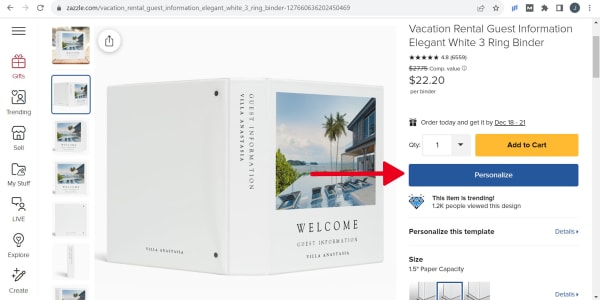
1) Pick an Avery binder design on Zazzle by clicking on the one you like.
2) Use the “Personalize” button to open a pop-up where you can add custom text and images.
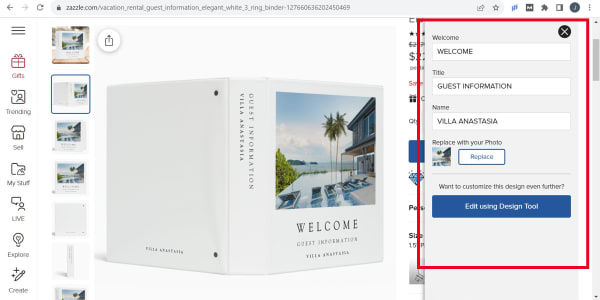
3) Quickly add custom text and images and choose color options if available.
4) Use the “Edit Using Design Tool” button to make more complicated changes.
How to design your own binder in Zazzle
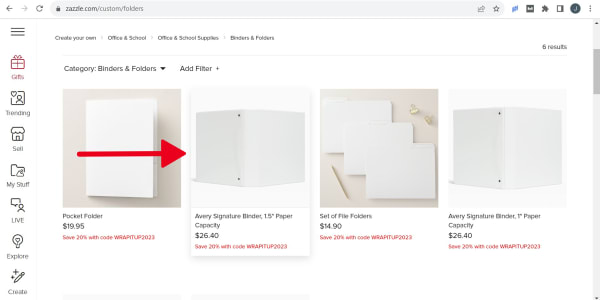
1) Choose a blank binder from the “Binders & Folders” tab on Zazzle.
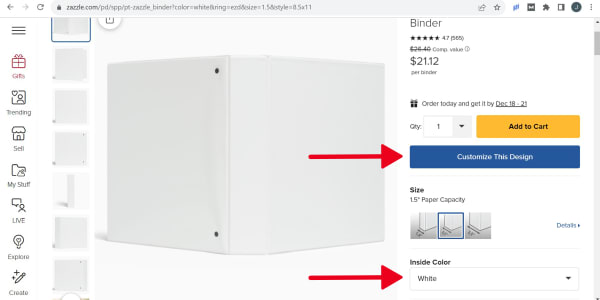
2) Choose your binder size and make your color choice if required.
3) Click “Customize This Design” to open the Zazzle editing screen.
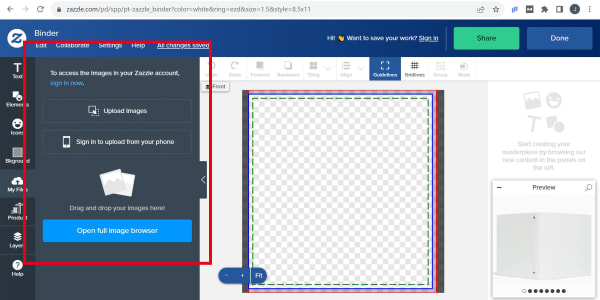
4) Add custom images, text, and other design elements using the Zazzle editing tools. Adjust colors and layouts to create a unique, professional binder.
Pro tip: Click “Upload Images” to add a business logo from your computer.
Uploading your own custom binder cover design
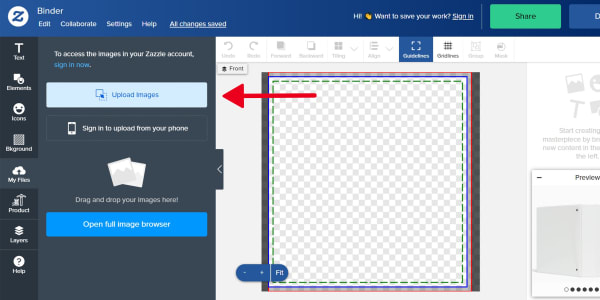
Follow the same steps as designing from scratch in Zazzle. Then use the “Upload Images” button to upload your own custom binder design from your computer.
Pro tip: When you sign up for a free Zazzle account, you’ll be able to upload images directly from your phone.
How to make DIY custom binders (at home)
This option is all about quickly creating exactly what you need without spending too much to do it. DIY custom binders are a practical choice when time is an issue, your budget is tight, or you plan on updating your binders often. I’m going to walk you through the steps to create custom binders at home that look pulled together and professional.
Step 1: Choose what you’ll print on
Decide what materials you’ll use for your DIY binder before choosing a design.
- Print binder covers on standard 8.5″ × 11″ paper or cardstock of your choice.
- Binder spine inserts are separate printable products designed to fit specific binder sizes.
- Choose a spine insert that matches the width of your binder (for example, ½”, 1″, 1½”, 2″, or 3″).
Pro tip: Avery binder spine inserts are made of cardstock which makes them easy to slip into the view pocket. I recommend printing covers on cardstock for the same reason.
Step 2: Pick a design for your cover and spine
Once you know what you’re printing on, choose a design to customize.
- Start with a pre-designed binder cover or spine template. You can customize design templates with your own logos, text, and more.
- Use a blank template to create your own design from scratch or upload a finished design to format it for printing.
- Make sure you’re using templates that match both your paper size and binder spine size.
New to Avery templates? Use our helpful guide to finding templates for Avery products. The article will walk you through how to use the Template Finder and your Avery product number to find the templates that match your binder spine inserts.
Step 3: Print your binder covers and spine inserts
When your design is ready, it’s time to print.
- Download your design as a PDF.
- Double-check your printer settings before printing.
- Print binder covers on your chosen paper or cardstock.
- Print spine inserts on the matching Avery printable spine products.
If you need help with printer settings or troubleshooting, this help article will walk you through common issues.
Step 4: Assemble your DIY binder
Insert your printed cover sheets and spine inserts into the clear pockets of a view binder.
That’s it. You can swap out covers and spines anytime you need to update the style or information. Just update, print, and you’re good to go.
Free templates for making DIY custom binders
Looking for inspiration? Here are 11 free design templates you can use to make a custom binder at home. Start by browsing the list below to find the one you like. Then, click the button to open the template directly in the Avery Design and Print Online editing screen.
Professional binder ideas for business

1) Client proposal binder
Print this design on binder spine insert 89103 and use with 1-inch view binders.
Print the cover design on 8-1/2″ by 11″ paper or cardstock to create a cover for any standard-size view binder.
2) Seasonal collection binder
Print this design on binder spine insert 89107 and use with 2-inch view binders.
Print the cover design on 8-1/2″ by 11″ paper or cardstock to create a cover for any standard-size view binder.
3) Sample presentation binder
Print this design on binder spine insert 89109 and use with 3-inch view binders.
Print the cover design on 8-1/2″ by 11″ paper or cardstock to create a cover for any standard-size view binder.
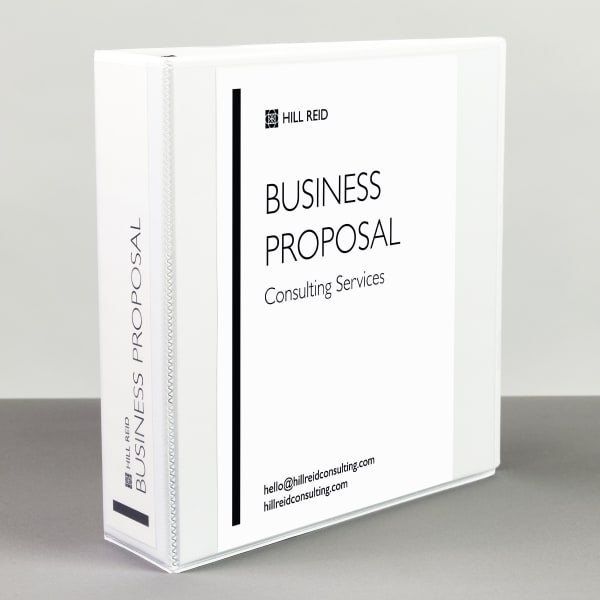
4) Minimalist business proposal
Print this design on binder spine insert 89109 and use with 3-inch view binders.
Print the cover design on 8-1/2″ by 11″ paper or cardstock to create a cover for any standard-size view binder.
Templates for trading card binders
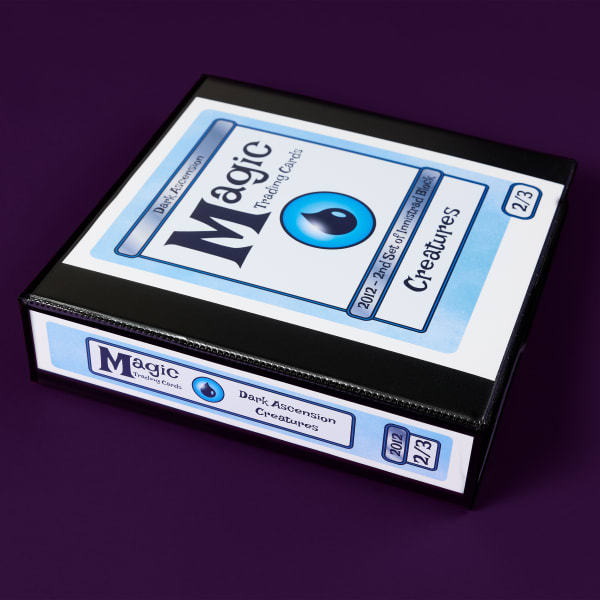
5) Magic trading card binder templates
Organize your Magic the Gathering card binder with this Magic-themed template.
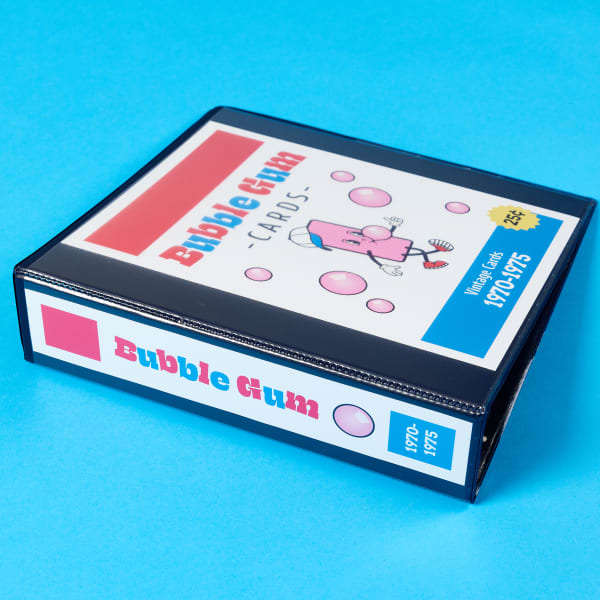
6) Templates for bubble gum card binder
Sort your bubble gum trading cards with this fun bubble gum card binder template.
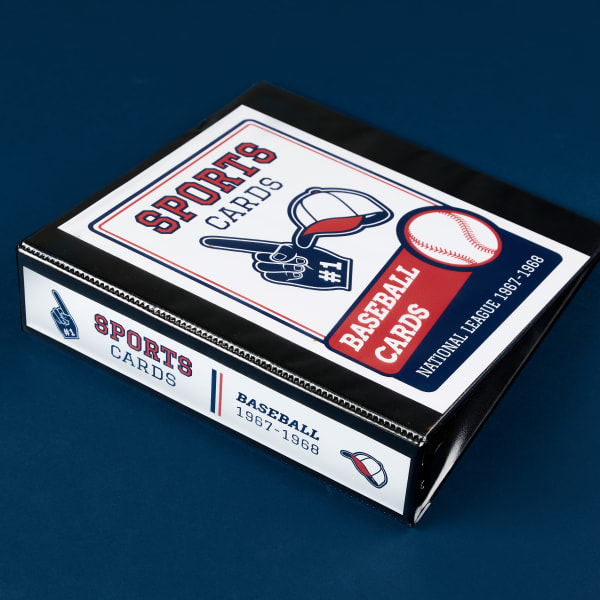
7) Baseball cards binder templates
Make your own card binder for any sport with this customizable template.
Custom recipe binder cover sheets and spines
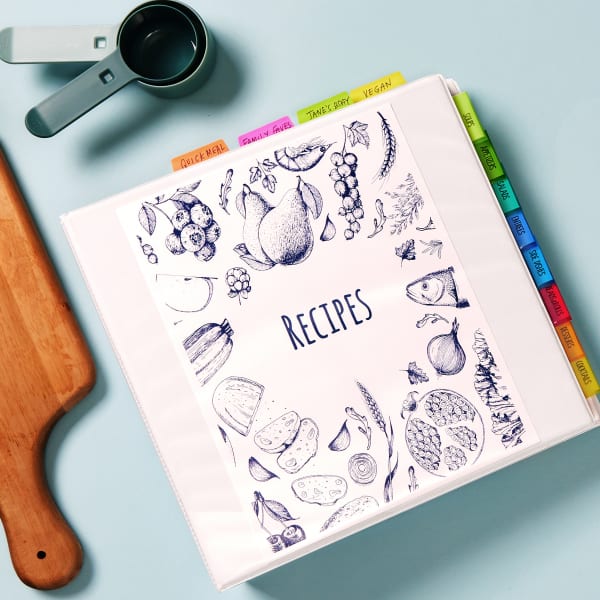
8) Illustrated recipe binder cover sheet template
Print this design on 8-1/2″ by 11″ paper or cardstock to create a cover for standard-sized view binders.
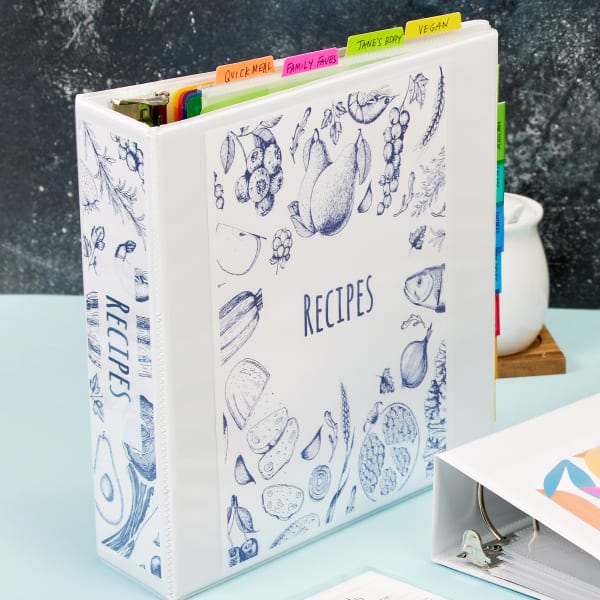
9) Illustrated recipe binder spine insert
Print this design on binder spine insert 89109 and use with 3-inch view binders.
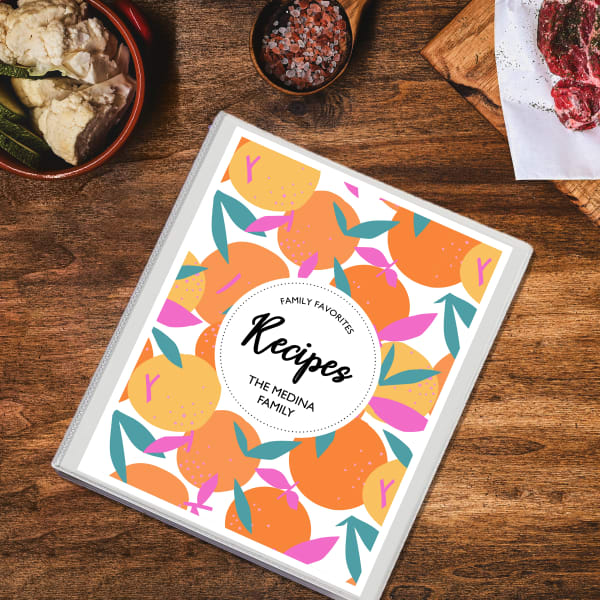
10) Colorful, citrus-inspired recipe binder cover
Print this design on 8-1/2″ by 11″ paper or cardstock to create a cover for standard-sized view binders.
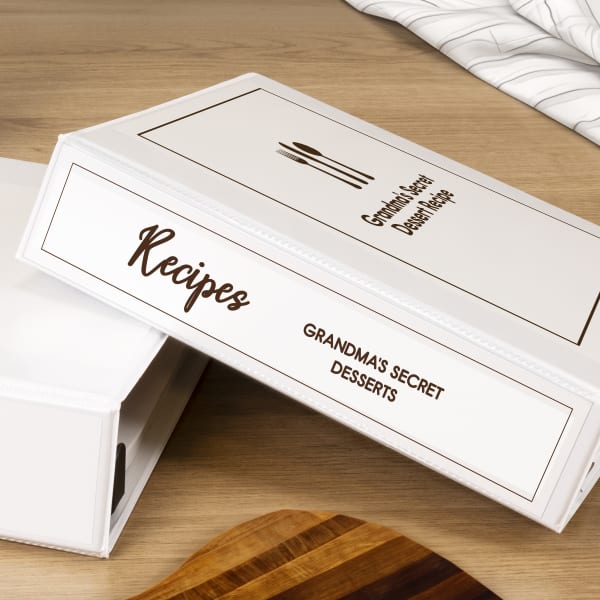
11) Clean & classic recipe binder spine insert
Print this design on binder spine insert 89107 and use with 2-inch view binders.
Get the look you want with a custom binder
Binders don’t always get the credit they deserve. But as you’ve seen, they can do a lot more than hold papers. A custom binder helps you show up polished, organized, and intentional. And it works no matter what you’re using it for. In fact, it works just as well for business presentations as it does for home, school, or personal projects.
The good news is that creating a custom binder really is easier than it sounds. With the right tools, you have more flexibility than ever to get the exact look you want. I’ve found that choosing the right option really comes down to urgency, scale, and budget. Using those criteria, it’s much easier to decide between professionally printed binders or a DIY approach using printable covers and spine inserts.
Whichever path you choose, you now have everything you need to get started—and plenty of free templates to explore if you want to keep experimenting. Pick what works best for your project, make it your own, and create a binder that feels as good as it functions.

