

5 Packaging Inserts to Help You Build Customer Loyalty
Discover 5 creative packaging insert ideas to thank customers, encourage repeat purchases, gather feedback and build customer loyalty.

How packaging inserts increase customer loyalty
Packaging inserts create a loop between you and your customers rather than a straight line ending at “point of sale.” When you use them to stay connected after a purchase, custom cards make it easier for customers to keep coming back to your business. I learned this when I started including promo postcards in every bag when I vended at a local summer market for six weeks. The cards had a glossy photo of my wares to remind people of my booth, a unique promo code, and a QR Code® to my website. I could track an increase in online orders in real time after each market night.
Once I saw customers coming back after events, I started using the same idea for online orders. I’ve included unique offer codes that let me track returning customers and QR codes that lead directly to my shop. When growing my email list was more important than making another immediate sale, I used inserts to send customers straight to my newsletter signup instead. In both cases, I could see the results in returning customers or increased signups.
The key is to hone in on one primary job for your insert. Once that’s handled, everything else is easy. Here are five creative ideas for packaging inserts you can adapt for your own small business.
5 creative ideas for packaging inserts
The five packaging insert ideas below include free design templates you can make your own. Click Customize on any design to open it in Avery Design & Print Online (our free software). There you can add your business information, change colors and fonts, upload images or a logo, and personalize the design for your goals.
1) Promotional packaging inserts for special offers and events
Turn packaging inserts into an incentive for customers to shop with you again. Add a promo code for their next purchase, invite them to an upcoming event or combine the two, like this design does. A unique offer code can also help you track how many repeat purchases come directly from your inserts.
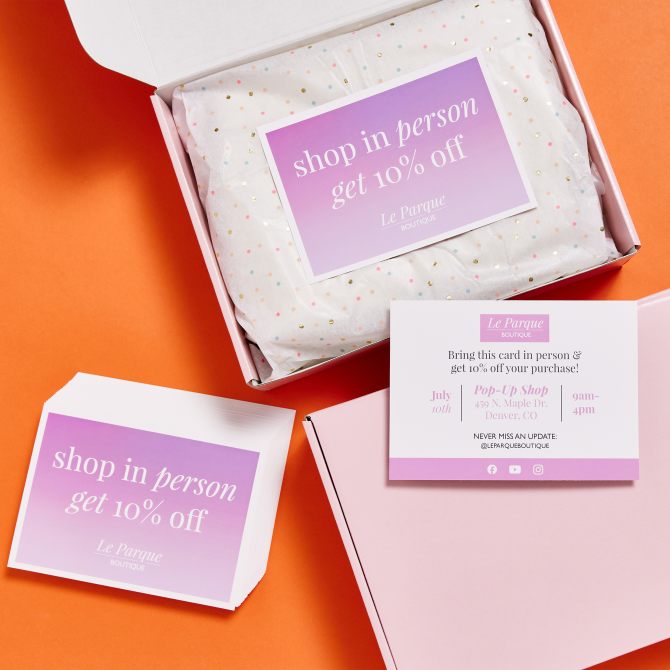
Get this design custom-printed on 5″ x 7″ cardstock.
Pro tip: Love the design but want to use it on something else? Save it to your Avery account, then apply the design to another Avery product.
2) Share seasonal reminders and helpful information
Packaging inserts can help customers plan ahead for seasonal deadlines, upcoming events or other time-sensitive information. For example, include your holiday order-by date so customers know when to shop for gifts, or share dates for an upcoming sale or event. You can also mail reminder cards to customers when it makes sense for your business.
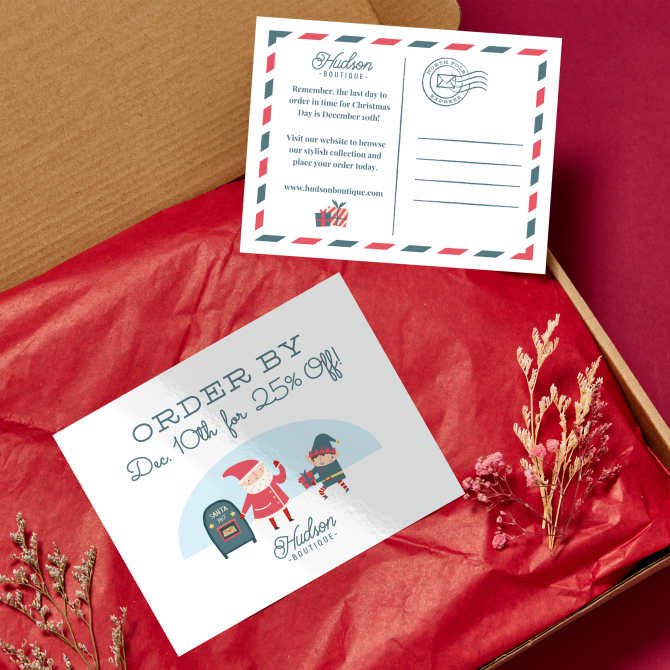
Customize this design for glossy white 4-1/4″ × 5-1/2″ postcards (Avery 8383).
3) Packaging inserts that encourage repeat purchases
Give customers a reason to come back by including a special offer for their next order. A unique promo code can encourage repeat purchases while also helping you track how well your packaging inserts are working. The built-in barcode generator in our free software makes it easy to add a QR Code® that takes customers directly to your shop so it’s easy to use their offer.
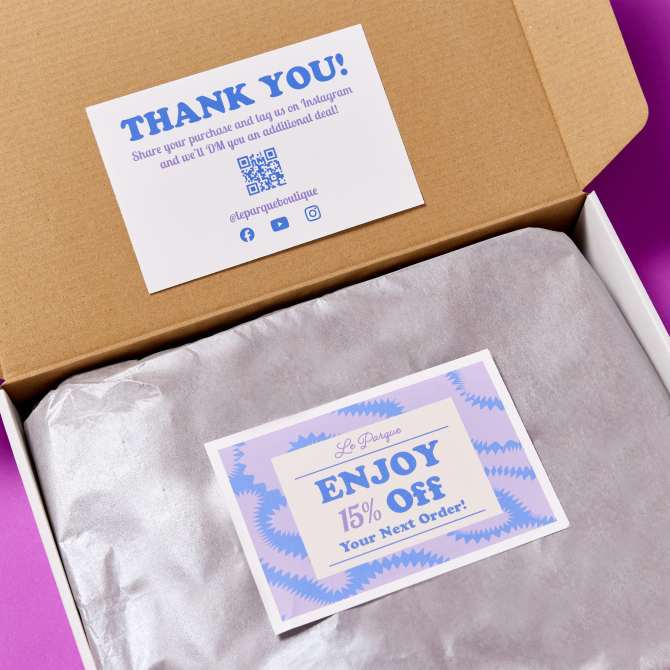
Customize this design for 4″ × 6″ matte white postcards for laser printers (Avery 5389) or inkjet printers (Avery 8386).
4) Use a QR Code to gather customer feedback
Packaging inserts make it easy to ask customers for feedback while their purchase is still top of mind. Add a QR Code that takes them directly to a survey, review page or feedback form so there are fewer steps between your request and their response. Need help setting one up? Follow our step-by-step guide to adding a QR Code to a business card—the same steps work for your packaging insert.
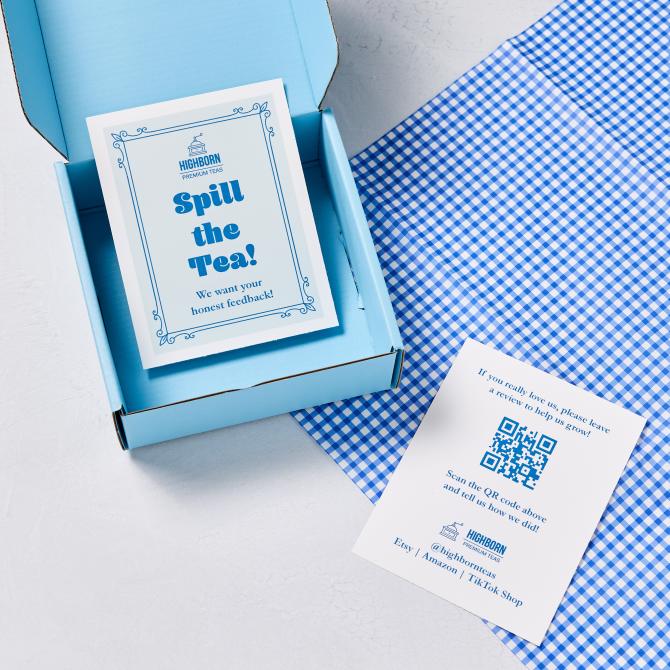
Customize this design for 4.25″ × 5.5″ matte white postcards for laser printers (Avery 5389) or inkjet printers (Avery 8386).
5) Business thank-you cards for customer orders
Business thank-you cards add a personal touch to customer orders while giving you another opportunity to stay connected after the sale. And because packaging inserts don’t have to go through the mail, you can get creative with the format. Custom-printed postcards offer options like rounded corners, scalloped corners and flourish edges that can make your insert feel a little more special.
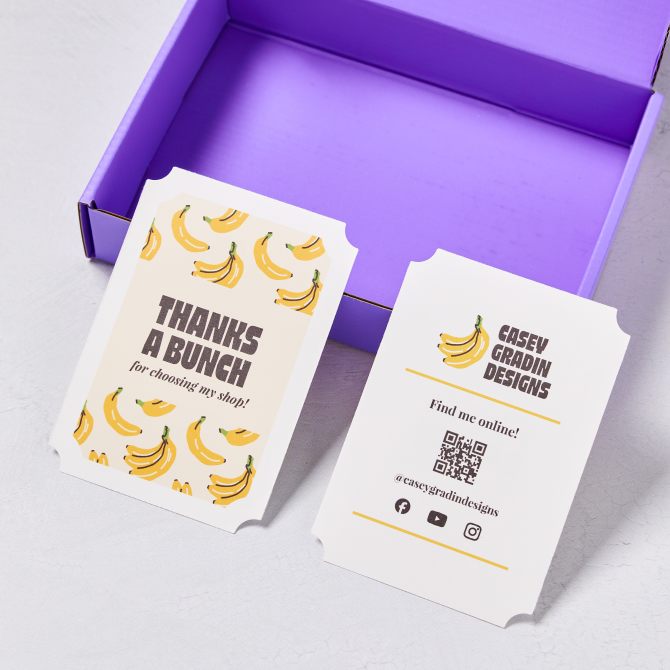
Like this idea? Explore thank-you card designs you can personalize for your business, or browse custom postcards to experiment with different shapes, corners and edges.
What should you put on a packaging insert?
Give customers one obvious next step, then let secondary information remain available without competing with it.
A postcard gives you enough space to include several messages, but they shouldn’t all have equal weight. Instead, I start with a primary action I wanted customers to take and give that message the most prominent space. Then I use the remaining space for information that helps customers find and stay connected with my business. Over the years I’ve noticed doing this always yields higher returns for me, but there’s actually some science behind it.
Studies on processing fluency show that people respond more favorably to information that’s easier to process. And that increases people’s willingness to act on the information. In other words, when one message clearly stands out, customers have less work to do to figure out what you want them to do next.
| Primary action | Supporting business information |
|---|---|
| Use a promo code for their next purchase | Business name and logo |
| Sign up for your newsletter | Website |
| Leave a review or provide feedback | Social media handles |
| Visit a product or sale page | Contact information |
| Attend an upcoming event | Other ways to stay connected |
| Follow your business on social media |
You might even devote an entire side of the postcard to your primary message. For example, use the front to thank customers and offer a discount on their next order, then use the back for your website, social media handles and other ways to stay connected.
Pro tip: Add a QR Code that takes customers directly to the page for your primary action, such as a newsletter signup, review form or sale page. Include the URL as well so customers have another way to get there.
How to make your own packaging inserts
The easiest way to get started depends on what you already have. If you have Avery cards on hand, start with the product number to find a compatible template. If you’re starting from scratch, you can browse designs first.
Already have Avery cards? Start with the product number
If you already have printable Avery cards, use the product number on the package to find templates made specifically for that product. Enter the number in the Avery template finder to see compatible blank and predesigned templates, then choose one to customize in our free software. Can’t find the product number? This quick guide can help, or give our Customer Care center a call at (800) 462-8379—they’re happy to help find your product number.
Starting from scratch? Browse designs first
If you’re starting from scratch, browsing designs is the quickest way to get going. Browse our postcard design templates to find a design you like, then customize it for your business and choose from the available printing options. Or, if one of the five packaging insert designs above caught your eye, simply click Customize to get started.
Tips for printing packaging inserts at home
The number one thing you can do to make sure your insert cards look good is to make sure that the printable postcards you use match your printer. We wrote in depth about what kind of printer to use for labels, but the information also applies to other Avery products, like postcards. Use the table below to match up your printable postcards and printer using information on the product packaging or web page.
| Laser | Only print with laser printers, or your card product may melt. |
| Inkjet or Pigment Inkjet | Only print with an inkjet or pigment inkjet printer, or your ink will never dry properly. |
| Laser/Inkjet or Dual Compatible | The product is specially designed to be able to be printed on laser or inkjet printers. |
Additionally, when printing Avery products yourself, there are a few other things you can do to get the best results. First, ensure your printer is set to “heavyweight” or “cardstock” to handle thicker materials effectively. Next, make sure the scale is set to 100% to maintain accurate sizing. Lastly, always print a test sheet on regular paper first to check alignment and layout. Following these tips ensures professional-looking Avery business postcards and other printed materials.
Customer loyalty is a loop, not a straight line
A purchase doesn’t have to be the end of the customer relationship. The right packaging insert gives customers an easy next step. That could mean they come back for another purchase, join your email list, follow you on social media or share feedback. Decide what you want that next step to be, then create an insert that makes it clear and easy to take.
If you’re ready to get customers circling back for more, get started by finding the right postcard design for your brand.

