
Fast Labeling
Quickly create and print OSHA-compliant labels with our fast and easy-to-use GHS templates.
Live ChatChat
(800) 462-8379Call Us
Create GHS Labels in Minutes
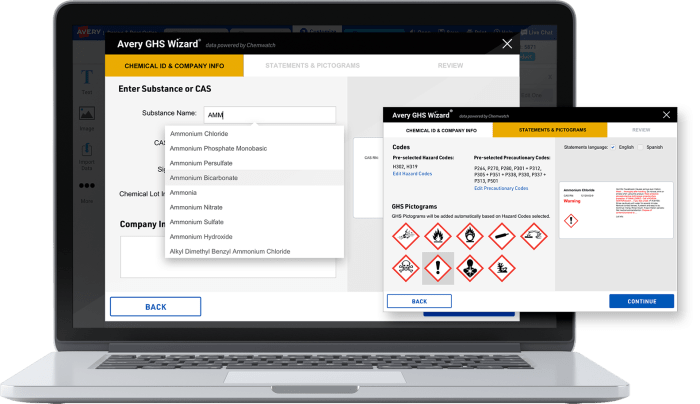
GHS Chemical Label Softwaredata powered by Chemwatch
Quickly create and print OSHA-compliant labels with our fast and easy-to-use GHS templates.

Access 300k+ pure, mixed and branded chemicals in our expert database powered by Chemwatch™

Find the info you need fast. Search our database by CAS#, product identifier or chemical name.

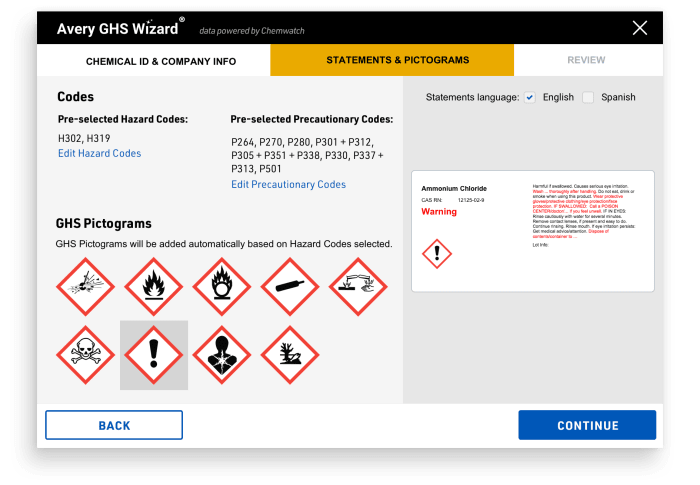
Increase chemical label accuracy with auto filled signal word and hazard & precautionary statements.

OSHA-compliant graphics. GHS pictograms are automatically added to your chemical labels for you.

Support Right-to-Know laws with English and Spanish versions of all statements.
You can instantly create and print more accurate GHS labels for a wider range of chemicals using the upgraded GHS Wizard features. This includes autofill chemical information for 300,000 chemicals, with continuously updated data that’s powered by Chemwatch.
For over 30 years, Chemwatch has provided solutions for chemical management, SDS authoring and regulatory compliance. Chemwatch GHS data for the Avery GHS Wizard is based on U.S. OSHA standards and is continuously updated, so you have the latest information for your GHS labels. Learn more about Chemwatch.
We accept most major credit cards including Visa, Mastercard, Discover, American Express and PayPal credit. Or check out with your PayPal account.
You can cancel any time and your subscription will remain active through the end of the current paid billing period. Refunds (including partial and prorated) are not available.
Yes. Using your free Design & Print Online account, you will always have access to blank label templates for manually creating labels with your favorite Avery Industrial products. With a free account you can still manually import pictograms and enter your hazard and precautionary statements using text boxes, referring to your SDS for the GHS Label information. Manually created projects can be printed without a watermark.
Yes! Preview the GHS Wizard now in Demo Mode. In this mode you will be able to preview the chemicals in our database and autofill labels, as well as experience various GHS Wizard features. However, you will not be able to customize, edit or print labels. Once subscribed, you will have full access to all of the features.
Avery UltraDuty GHS chemical labels are designed to work seamlessly with the GHS Wizard and are available in a wide range of sizes. You can order blank UltraDuty labels online by the package or by the sheet . We can even custom-print GHS labels for you. Or, give us a call at (800) 462-8379 to help you place an order over the phone.
Yes, any project you created and saved prior to the launch of the subscription can be edited and printed without limitation. Only new projects initiated in the GHS Wizard require the subscription.
Yes! Check out our GHS Wizard Overview video.